|
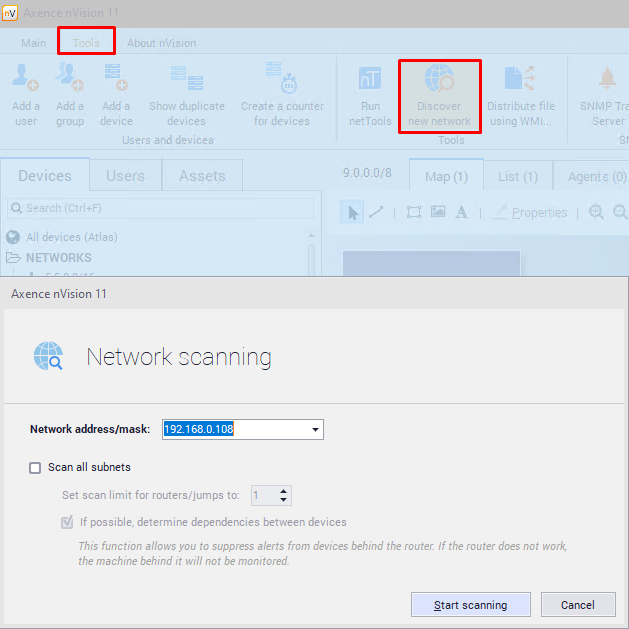
The network discovery wizard lets you define the options needed for correct network scanning. It starts when you add a new network and when you create the Atlas.
Options for scanning a new network
These options define which network is scanned and how.
Property
|
Description
|
Address
|
Enter the IP/DNS address of a computer in the network to scan. By default, the program suggests the local address; leave it if you scan the local network.
|
Mask
|
The network mask. In most cases, you do not need to change the default mask "255.255.255.0". Changing it can make scanning take a very long time.
|
Scan subnets
|
Select this option if there is a router in your network and you also want to scan the neighboring networks behind it.
Axence nVision® can scan not only the specified network, but also pass through routers in this network to scan all connected networks. This function requires SNMP to be enabled on the router and the SNMP community to be specified. The program reads the routing table and starts scanning all networks connected through the router.
|
Set the scanning limit for routers/hops to
|
The limit of hops (routers) during scanning.
|
If possible, determine dependencies between devices
|
This function limits alerts from devices behind a router. If the router is down, the devices behind it are not monitored.
|
Click on [ Scan ]. Scanning starts and you can follow its progress. You can stop it at any time; then you can add the networks and devices discovered so far.
When scanning is complete, a window shows the number of discovered networks and devices. Click on [ OK ] to close the scanner and add the discovered networks and devices to the Atlas.
|